
Email Digest and Online Quarantine Portal

With our email digest and Retarus Email Security's online quarantine, your end users get a clear overview of filtered messages and can review and release them themselves.
More self-service for your end users means less work for your admins, fewer support tickets, and more time for tasks that truly require your attention. And you always remain in control: you decide how much self-service you want to allow.
Self-service can be so easy
Retarus Email Security reliably filters incoming emails using a variety of sources and algorithms, initially moving suspicious or unwanted messages to quarantine. However, users should be able to review these emails—which have been blocked as a precaution—themselves and release them if necessary.
The Email Digest: Delivered Directly to Your Inbox Every Day
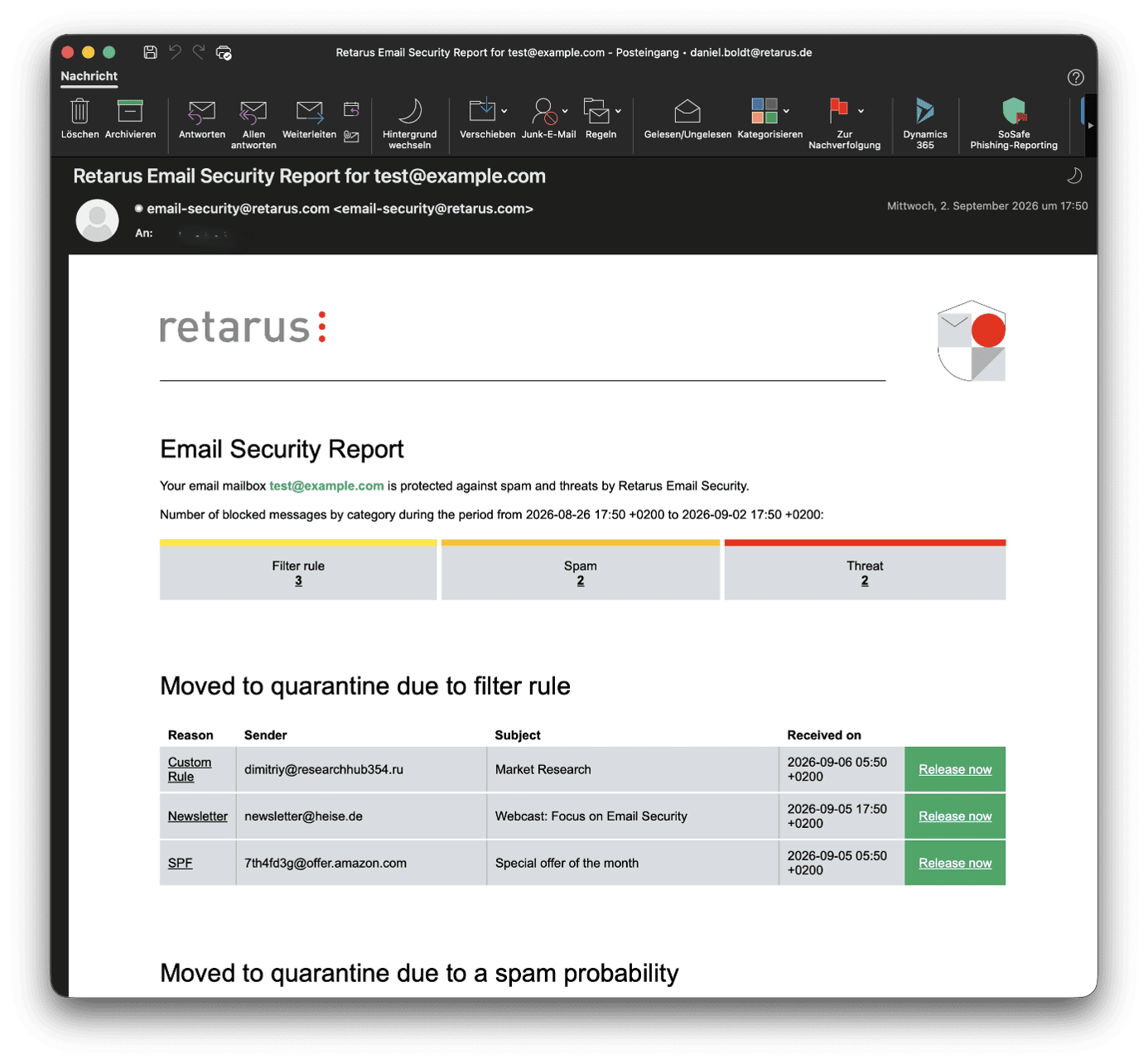
The “Digest” (officially: Retarus Email Security Report) automatically provides an overview of all messages that have been blocked or moved to quarantine at a delivery time that can be freely configured. These messages can be released directly from the Digest with a single click.
The Quarantine Portal: More Details and Configurations
End users can access their personal quarantine portal directly through a browser using a secure token-based login; a username or traditional login is not required. All blocked messages are clearly summarized in the portal and can be searched, previewed, and—thanks to easy-to-understand explanations—easily understood even by non-technical users.
Releasing Items from Quarantine in Four Steps
1.
Receive the digest or open the portal
The daily digest is automatically delivered to your inbox. Alternatively, end users can open the quarantine portal in their browser.
2.
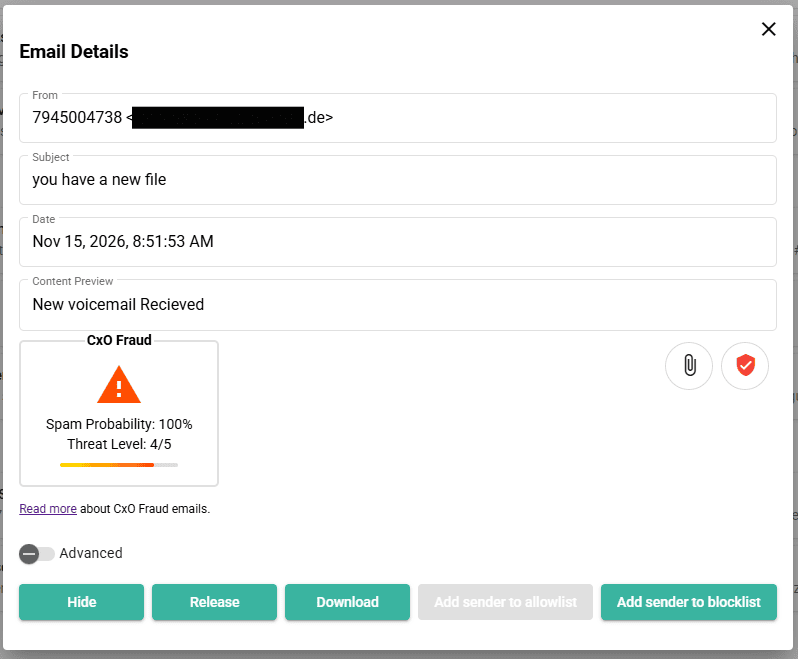
Check the message
Blocked messages are color-coded according to threat level (using the same traffic-light system in the digest and on the portal). Clear terminology and easy-to-understand explanations for each message help users assess the potential risk. The portal also provides a preview and additional information for each message.
3.
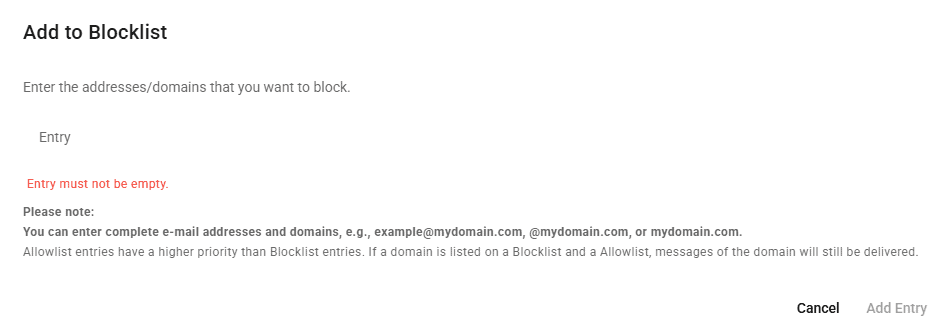
Approve or Permanently Allow Sender
With a single click, the end user can approve a message. The personal allowlist can be used to permanently allow a sender—for example, for a desired newsletter. Similarly, there is a personal blocklist.
Always Keep Track of Blocked Messages
End users can keep track of their filtered messages—without your team having to intervene.
- A central hub for all emails: Blocked messages from all personal addresses (including aliases) in one place
- Clear Categories: Spam, threats, and newsletters are displayed separately. Clear-cut threats appear in their own category and are thus clearly distinguished from user-configured filter rules.
- Quick Search: You can find specific messages, for example, by attachments or the reason for quarantine.
- Preview and Details: Each message is accompanied by a threat level, the reason for filtering, and additional information—before it is delivered.
- Personal Settings: You can easily manage your own block and allow lists.
Want more details?
You can find the complete “User Manual” for Digest and Online Quarantine (in English) in the Retarus Documentation Center.
Go to the guide in the Documentation Center
Request a Personal Consultation
More self-service for your users while maintaining full control
Self-service complements your existing process but does not replace any of your security policies. You decide which features your end users are allowed to use.
You retain control over …
- … Security Policies and Filter Rules
- … Configuration options in the myEAS admin portal
- … your help desk process for actual incidents
Self-Service Tailored to Your Specifications
- As much self-service as needed: You activate only the features that you want your end users to configure themselves.
- Custom Schedule: The delivery time for the daily digest can be configured.
- Custom Corporate Design: Upon request, the Digest template can be customized to match your corporate design.
- One-click email sharing: Messages can be shared directly from the digest or the portal, provided you enable this feature.
End users do not need any additional software—the portal runs in a browser and on all devices, and the digest is sent via email.
Your Benefits at a Glance
Fewer Support Tickets
Time for the Important Tasks
Easy to understand for everyone
End-User Control
Frequently Asked Questions
How do end users receive the digest?
The email digest is automatically delivered to your inbox every day at a time you can configure. You can share messages directly from the digest.
Do end users need to register for the quarantine portal?
No. Access is granted via a secure token-based login. A username or traditional login is not required.
Does that also apply to alias addresses?
Digest and Portal centrally aggregate blocked messages for all of an end user's email addresses, including personal aliases.
In which languages exactly are Digest and Portal available?
The online portal is currently available in eleven languages: German, English, French, Italian, Malay, Dutch, Portuguese, Polish, Romanian, Spanish, and Thai. The Email Security Reports (“Digest”) are also available in multiple languages and can be customized using individual templates.
How can end users tell if a message is dangerous?
Messages are color-coded according to their threat level. Each message includes a clear explanation of why it was filtered. The portal also displays a preview and additional information before a message is delivered.
Why is there a separate category for newsletters?
What one person considers spam, another may view as a welcome newsletter. That’s why Retarus Email Security displays newsletters and other bulk emails as a separate category alongside spam and threats. End users can see at a glance which messages have been classified as newsletters. If you enable the self-service feature, they can approve these messages with a single click or permanently allow them via their personal allowlist.

Learn more about Retarus’ security features
Digest and Online Quarantine are part of Retarus Email Security
Learn more about the algorithms behind our Retarus Advanced Threat Protection, AI-Powered Sandboxing, and Post-Delivery Protection. For comprehensive cybersecurity and protection against the latest email threats.