


Una visión general centralizada de todos los documentos comerciales procesados, exportación en segundo plano incluso de grandes volúmenes de datos, vistas personalizables y acceso directo a los datos de origen y destino: El nuevo EDI Conversion Reporting ya está disponible para todos los clientes de Retarus EDI, WebConnect e Intelligent Document Processing (IDP) en el portal myEAS. Así podrás tener una visión general y evaluar los procesos de documentos de forma más rápida y flexible, tanto desde el ordenador como desde el móvil.
Un sistema de informes para todos los documentos comerciales
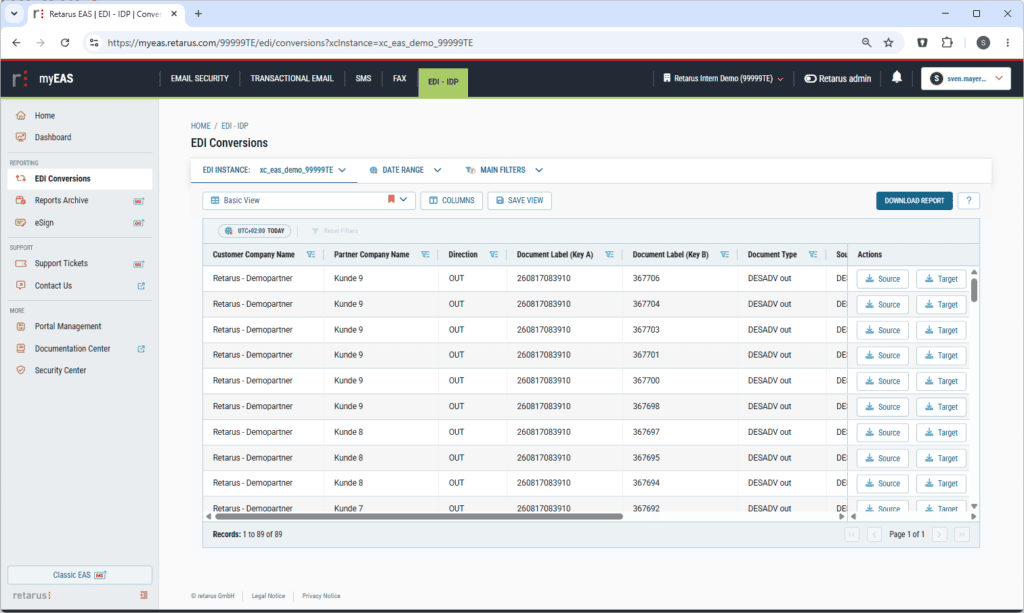
Ya sean mensajes EDI clásicos, proveedores conectados a través de WebConnect o documentos procesados mediante IDP: el EDI Conversion Reporting reúne todos los documentos comerciales procesados por Retarus en una vista centralizada. De este modo, los departamentos especializados y la dirección disponen en todo momento de una visión general actualizada de sus procesos documentales, desde un único documento hasta el volumen total de documentos.
Tus ventajas
- Todos los documentos comerciales, tanto de EDI, WebConnect como de IDP, en una sola vista
- Total transparencia en todos los procesos documentales
- Búsqueda rápida de operaciones concretas, por ejemplo, en caso de consultas de socios comerciales
Exporta grandes cantidades de datos y sigue trabajando sin problemas
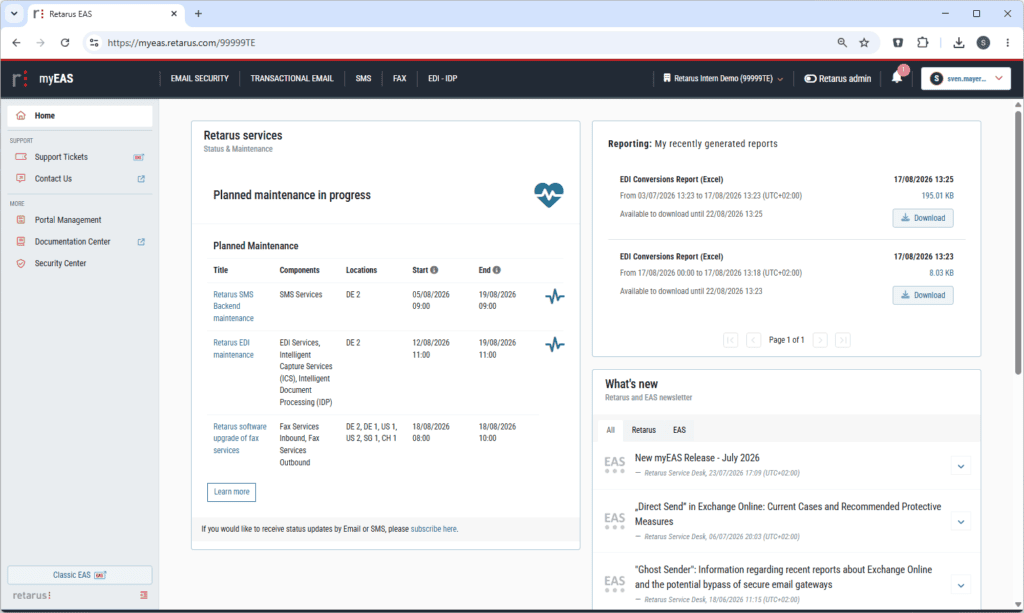
Ya sea un análisis trimestral, la preparación de una auditoría o una investigación exhaustiva: incluso con grandes volúmenes de datos, la nueva función de generación de informes elabora tus informes en segundo plano. Mientras tanto, puedes seguir trabajando en el portal sin interrupciones. Los informes terminados estarán disponibles de forma centralizada en el menú de inicio para que los consultes.
Tus ventajas
- Exportación sin problemas incluso de grandes cantidades de datos
- Seguir trabajando sin interrupciones mientras se generan los informes
- Acceder a los informes ya generados de forma centralizada en el menú de inicio
- Elaborar de forma autónoma informes para auditorías y consultas de cumplimiento normativo
Los datos tal y como los necesitas
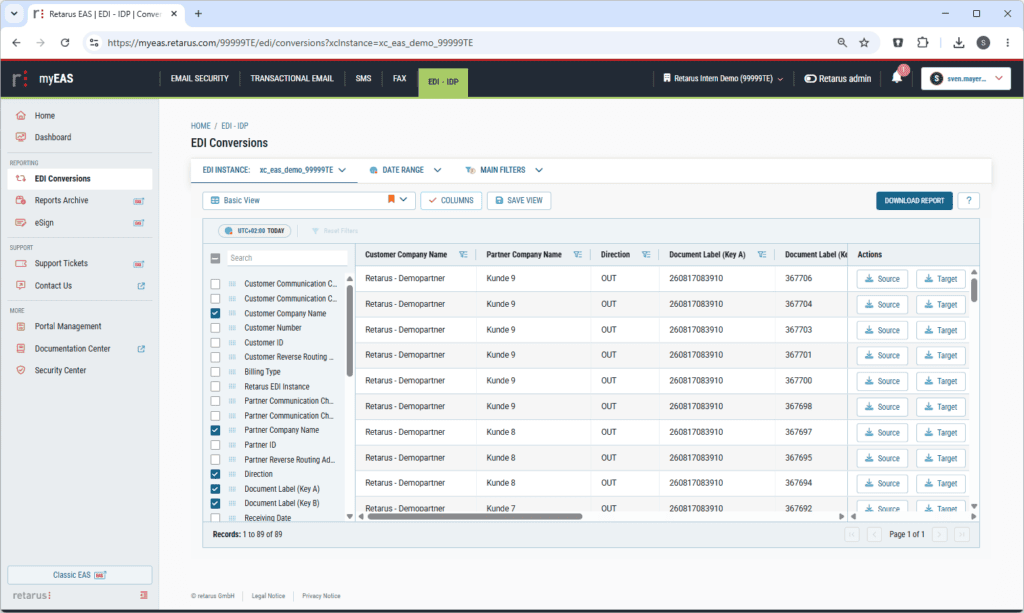
Tú mismo decides qué información debe incluir un informe: gracias a la nueva configuración de columnas, puedes seleccionar específicamente los campos que sean relevantes para tu caso concreto; por ejemplo, números de documento y estado para contabilidad, o detalles técnicos como canales de comunicación e información de enrutamiento para el departamento de TI. Así, cada equipo recibe exactamente la información que necesita para sus tareas.
Tus ventajas
- Informes adaptados a tu propio proceso
- Análisis más rápido gracias a que te centras en los campos relevantes
- Diferentes vistas para diferentes equipos
Llega antes a tu destino, tanto en el ordenador como en el móvil
Las funciones de descarga de datos de origen y de destino, que probablemente sean las más utilizadas en el día a día de la elaboración de informes, ahora están integradas de forma fija en la vista. Así, puedes acceder a los documentos de origen y de destino directamente desde la fila correspondiente, sin tener que dar pasos adicionales de navegación. Al mismo tiempo, una mayor velocidad, una navegación optimizada y una visualización adaptativa garantizan un uso más cómodo. Así podrás comprobar el estado de tus procesos documentales incluso cuando estés fuera de casa, desde tu smartphone o tableta.
Tus ventajas
- Descargar los datos de origen y destino directamente desde el resumen
- Navega más rápido y encuentra más fácilmente la información que necesitas
- Utilizar los informes también en el móvil y la tableta
Transparencia que agiliza los procesos
El nuevo EDI Conversion Reporting ofrece a los usuarios en todo momento una visión general completa y actualizada de los documentos comerciales que procesa Retarus, sin importar el canal, el volumen de datos ni el dispositivo que uses. Los departamentos especializados encuentran los documentos relevantes más rápido, responden por su cuenta a las consultas de los socios comerciales y elaboran informes para auditorías directamente en el portal. Esto reduce el esfuerzo en el día a día y, al mismo tiempo, ofrece una visión general centralizada de los procesos documentales críticos para el negocio.


Enviar un comentario