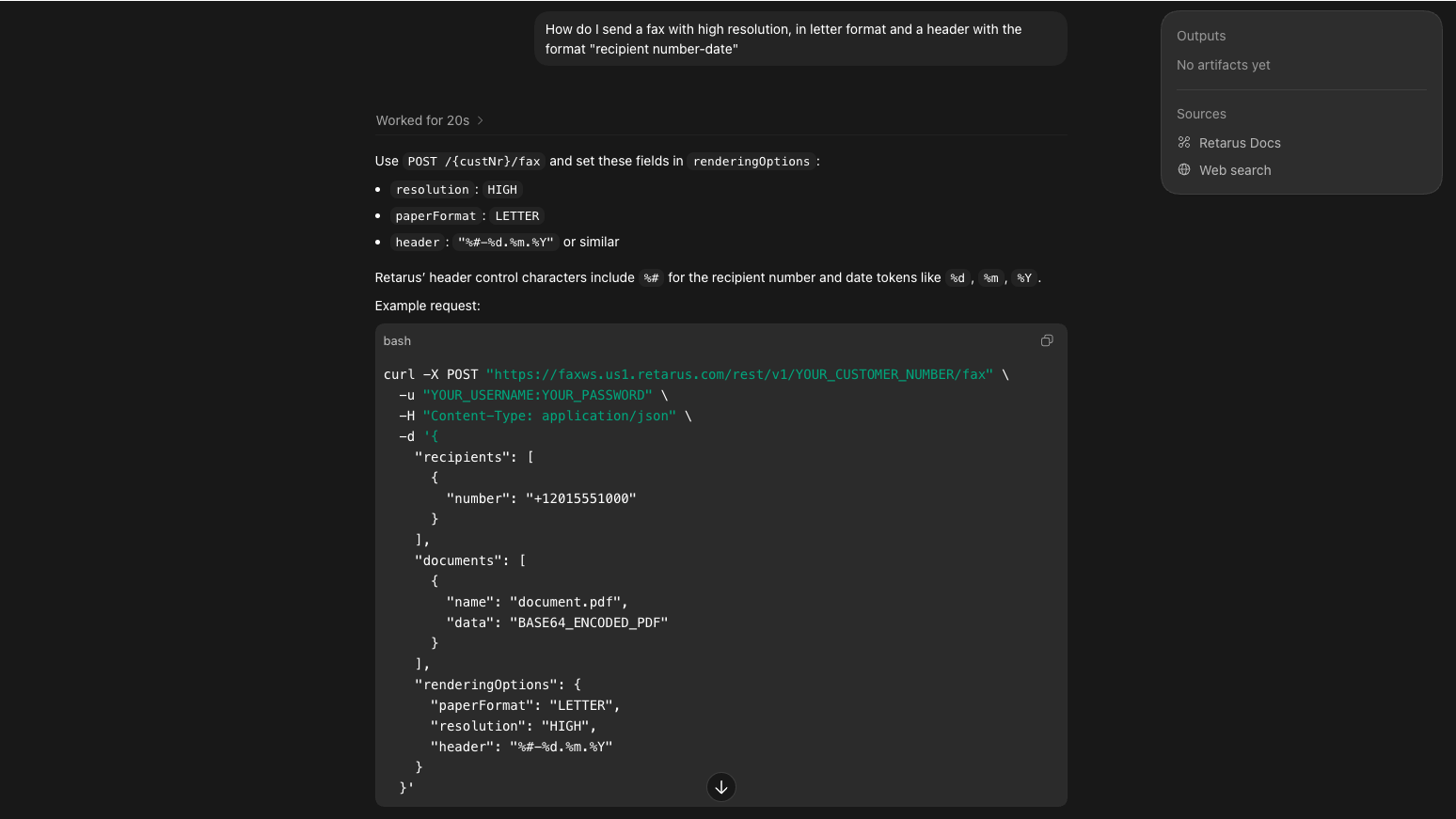
Retarus is introducing the new Docs MCP Server, a capability that connects AI developer tools directly to Retarus API documentation.
The Retarus Docs MCP Server enables AI tools to retrieve official Retarus documentation on demand and provide implementation-ready answers directly in context. Instead of manually navigating documentation pages, searching endpoints, or cross-referencing authentication requirements, developers can work directly with AI tools that are grounded in authoritative Retarus documentation.
This creates a significantly faster and more efficient onboarding and implementation experience for customers and development teams.
Turning AI Into an Implementation Accelerator
Modern development teams increasingly rely on AI-assisted coding tools such as Claude, Cursor, ChatGPT, and VS Code to speed up development workflows.
The Retarus Docs MCP Server allows these tools to access public Retarus API documentation directly, including:
- REST API references
- Authentication requirements
- Request and response structures
- Parameter definitions
- GraphQL reporting documentation
- Mock server information
- Integration examples
The result is a more streamlined implementation process with less time spent searching documentation and more time building integrations.
A Faster Path from Documentation to Production
One of the biggest challenges during onboarding and implementation is finding the right information quickly enough to maintain momentum.
With the Retarus Docs MCP Server, AI tools can retrieve the relevant documentation instantly and generate contextual, implementation-ready guidance. Solving common development team needs like:
- Identifying the correct API for a use case
- Locating the right endpoint
- Confirming authentication requirements
- Understanding payload structures
- Validating implementation details across multiple documentation pages
For example, a developer can ask an AI assistant: “Use the Retarus MCP doc server to find how to send a fax with a base64-encoded PDF, configure failure notifications, test against the mock server, and generate a Python example.”
This reduces onboarding friction, shortens implementation cycles, and helps teams move from evaluation to production faster.
A Valuable Advantage Beyond Developers
The value of the MCP server is not limited to technical users. Business stakeholders, operations teams, finance departments, and customer service teams can also use AI tools connected to the MCP server to retrieve answers from Retarus documentation in plain language.
Examples include questions such as:
- What inbound fax delivery options are available?
- Is SMS supported in a specific region?
- Which notification options exist for failed deliveries?
- How are different document types processed?
Instead of manually searching technical documentation or waiting for engineering support, users receive direct answers based on official Retarus documentation.
Simplifying Reporting and Operational Analysis
The MCP server also improves access to advanced reporting capabilities.
For example, a finance manager using the Retarus GraphQL Reporting API can ask an AI assistant to generate a complete reporting query for multiple billing codes, including delivery status, destination country, and page counts.
The AI retrieves the correct query structure, filters, and field definitions directly from the documentation and generates a ready-to-run query for analytics tools such as Altair.
What previously required multiple filtered exports, manual spreadsheet merging, and knowledge of GraphQL schema details can now be completed through a single AI-assisted workflow.
This enables non-technical teams to work more efficiently with operational and billing data while reducing manual effort.
A New USP for Faster Customer Onboarding
The Retarus Docs MCP Server represents a significant differentiator for implementation and onboarding workflows. By combining AI-assisted development with direct access to trusted Retarus documentation, organizations benefit from:
- Faster onboarding
- Reduced implementation complexity
- Shorter integration timelines
- Less dependency on manual documentation searches
- Improved developer productivity
- Easier access to reporting and operational insights
- Better self-service capabilities across technical and non-technical teams
For customers evaluating communications APIs and enterprise integration platforms, this creates a measurable advantage.
Security and Data Protection
The Retarus Docs MCP Server is strictly read-only. It does not execute API calls, submit jobs, access customer environments, nor interact with Retarus systems on behalf of users. The server only returns documentation content already publicly available through Retarus API Docs. All prompts and interactions remain within the AI tool being used. No customer credentials or operational data are required.
As with any AI-generated output, implementations should be validated against the official documentation and tested before production deployment.
Getting Started
Full setup instructions and connection details for the Docs MCP Server are available at our API Documentation Center.