


With the new reporting feature in Retarus Intelligent Document Processing (IDP), you can easily create custom analyses of document processes on your own. Users with the “Admin” and “Manager” roles can select metrics, filters, and time periods as needed and receive the results as an Excel file.
Custom Analyses Instead of Standard Reports
How many documents were received last week? How well is the automation working? And what tasks within the team require manual processing time? Until now, there were two ways to answer such questions: using predefined standard reports or requesting a custom report from Retarus.
With the new reporting feature, users can now create their own reports at any time and tailor them precisely to their information needs. The result is available as a clearly organized Excel workbook.
This offers three key advantages:
- Custom reports via self-service. Data can be filtered by sender, preset, user who processed it, or status, and grouped by day, week, or month. The time period can be selected freely. This allows users to answer specific business questions on their own in just a few minutes.
- Key metrics at a glance. The reports summarize, among other things, document volume, automation rate, correction rate, HITL (Human-in-the-Loop) effort, and processing times. This provides the metrics needed to evaluate and manage quality and automation.
- Transparent and traceable results. Each Excel file contains the configuration used to generate it—including the time period, filters, and column selection. This allows other recipients to understand how the results were derived. Generated reports also remain available in the portal for 30 days.
Five Steps to a Customized Report
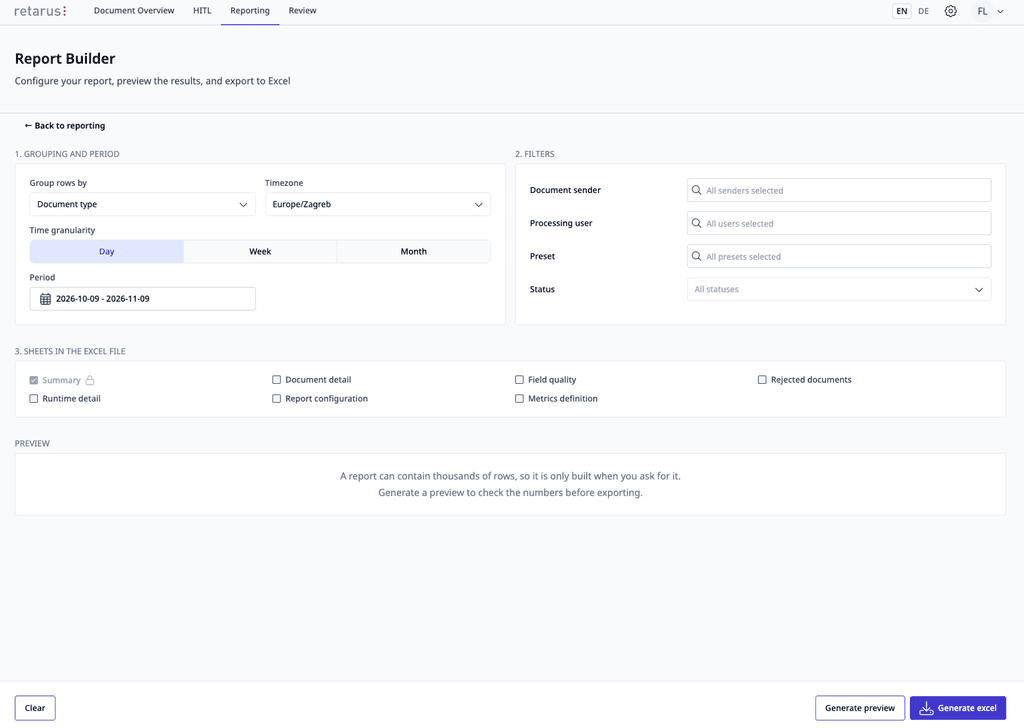
On the Reporting page, there are two new entry points: “Report Builder” and “Generated Reports.”
The Report Builder guides you through the configuration in five steps: First, you define the grouping and time period; then, you select the desired filters and worksheets. In the fourth step, you can add optional additional columns to the “Document detail” worksheet—including your own user-defined reporting fields. Finally, you can generate a live preview of the report.
Check First, Then Generate
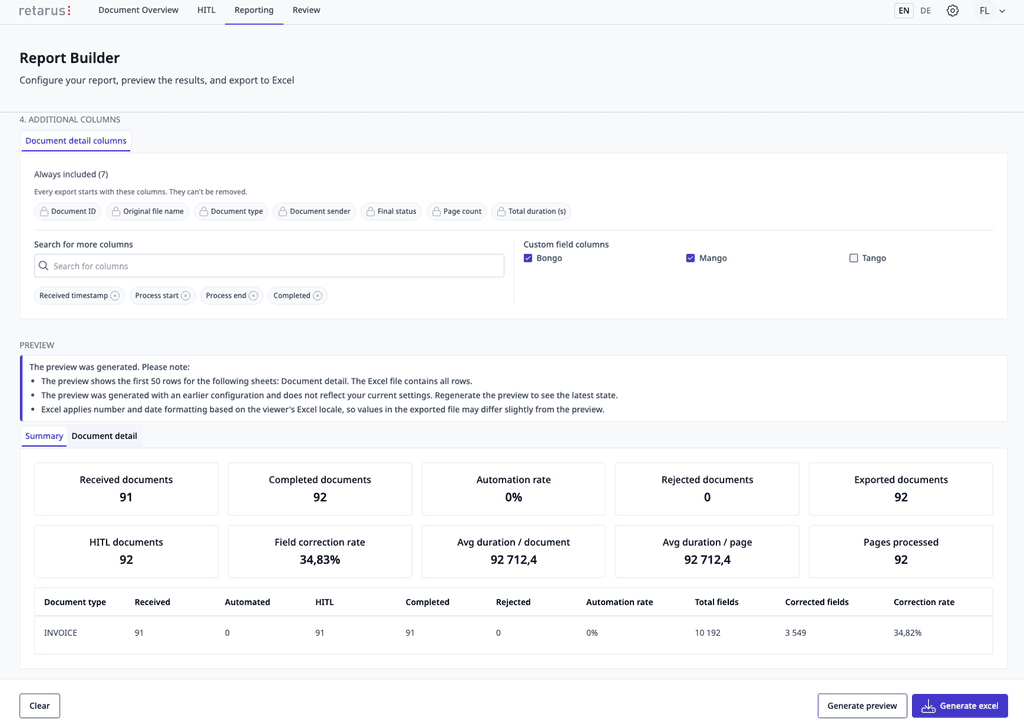
The “Generate preview” option lets you check in advance what the finished report will look like. The preview shows the first 50 rows of each worksheet. This allows users to verify that the results are plausible and adjust the filters if necessary.
Click “Generate Excel” to create the complete file. The generation process runs in the background, so you can continue working in the portal while it’s running.
All Reports in a Single Excel File
The final report is provided as a single Excel workbook. It always includes the “Summary” worksheet with the key metrics: documents received and completed, automation rate, correction rate, and processing times. A supplementary table shows daily trends, providing a quick overview of the document processes.
Depending on the configuration, additional worksheets may be included:
- Document details: one row per document; can be expanded to include custom columns
- Field quality: Information about field quality
- Rejected documents: An overview of rejected documents
- Runtime details: Details on processing times
- Report configuration and metric definitions: the report configuration and explanations of the metrics used to ensure full traceability
Up to 100,000 rows can be output per worksheet. This makes it possible to represent even extensive time periods in a workbook.
Generated Reports Available for 30 Days
Reports that have already been generated can be found under “Generated reports.” They remain available there for 30 days and can be downloaded again within that time frame. The overview also shows the respective status and the date and time of creation.
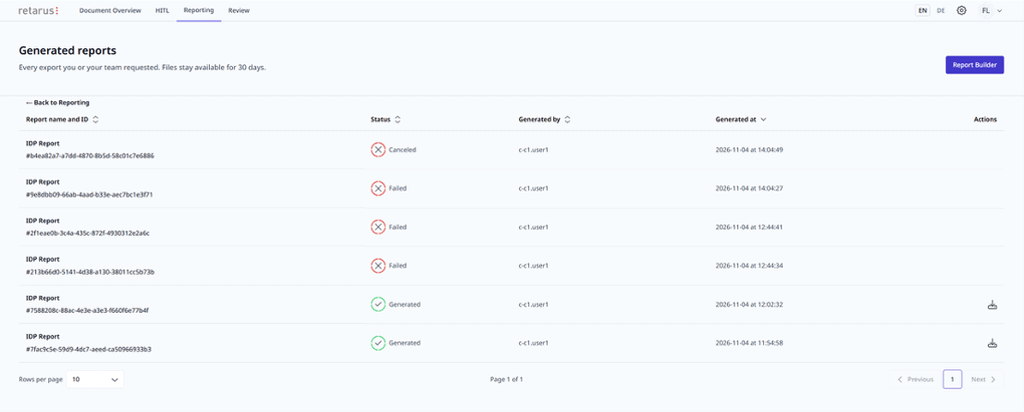
The new “Custom Reporting” feature is available to users with the “Manager” and “Admin” roles. Only users with these roles have access to the “Reporting” section.
For more information about Retarus Intelligent Document Processing and the solution’s applications, please visit our IDP product page.



Submit a comment