
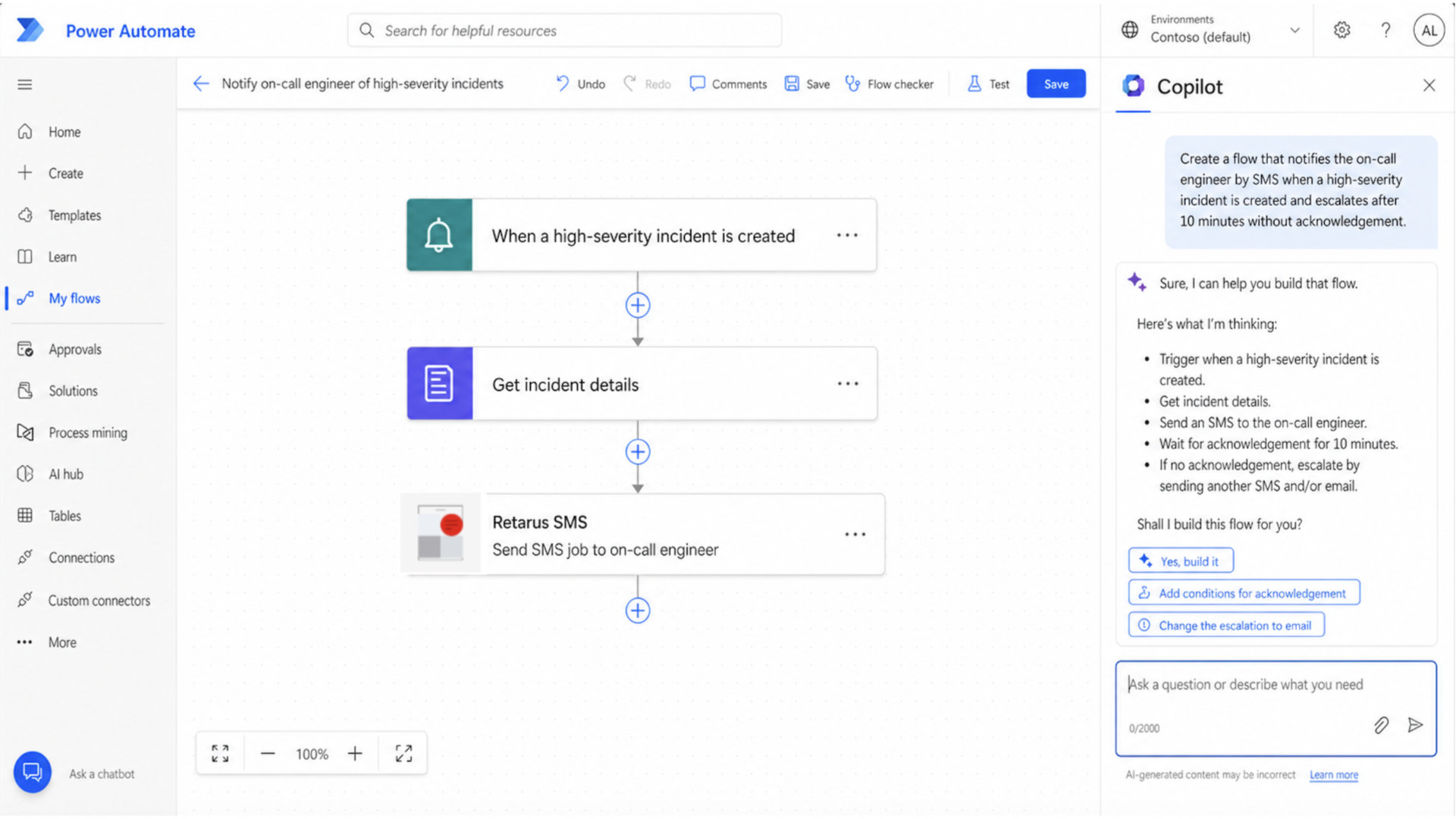

Microsoft users can now bring enterprise-grade SMS directly into low-code workflows with the Retarus SMS connector, which is listed on Microsoft Learn for Power Automate, Power Apps, Logic Apps, and Copilot Studio. The connector gives organizations a direct way to send SMS, query job status, retrieve per-recipient delivery results, and access API version details from within Microsoft’s automation environment.
SMS becomes a native workflow step
The key value of the new connector is simple: SMS can now become a native action inside Microsoft workflows instead of a separate integration project. When teams build a flow in Power Automate, create an app in Power Apps, work with Logic Apps, or design conversational automations in Copilot Studio, they can search the Microsoft connector catalog for Retarus SMS and use it as part of their business process design.
The official Microsoft connector page is here: Retarus SMS connector on Microsoft Learn.
Microsoft lists the connector for Copilot Studio as Premium, for Power Apps as Premium, for Power Automate as Premium, and for Logic Apps as Standard, with availability across all standard regions.
How the connector is provided in Microsoft
From a practical perspective, the connector is available where Microsoft users, integration architects, process owners, analysts and managera already work.
In Power Automate, users add a new step, search for Retarus SMS, create a connection with their Retarus credentials, and then insert SMS actions into a flow just like any other Microsoft or third-party connector.
What you can do with it
The SMS connector supports five core operations. These are enough to cover both straightforward alerting scenarios and more advanced transactional messaging patterns.
- Send an SMS job to one or more recipients.
- Retrieve job status and related SMS IDs.
- Retrieve all jobs for a time range or other criteria.
- Retrieve delivery status for every recipient in a job.
- Get version information for the underlying API.
This matters because it moves the discussion beyond “send a text” to real process integration.
A Power Automate flow can send a message, capture the returned job ID, check delivery progress, and trigger follow-up steps based on message outcome.
A strong Copilot use case
One of the most compelling modern use cases is in Copilot Studio, where Microsoft explicitly lists the connector as available. That means organizations can combine conversational experiences and AI-guided process orchestration with enterprise SMS as an execution channel.
A strong example is an AI-assisted service escalation process. Imagine a Copilot-driven support experience that identifies a high-priority outage, gathers the right context from the user, creates a case, and then triggers a Retarus SMS message to the on-call engineer and backup contact Because the connector also supports status retrieval, the workflow can continue by checking whether the job was processed and logging the result back into the case or operations system.
This is a particularly good fit for Retarus because enterprise SMS is designed for critical, time-sensitive notifications, high scalability, and transparent reporting. Retarus Enterprise SMS provides users with connectivity to 99% of all mobile networks worldwide, in compliance with regional regulations and international standards. Delivery rates achieve the highest quality and throughput, as customers are provided with active carrier management that meets their specific requirements.
Modern cases for Power Automate and Logic Apps
The connector also fits naturally into modern workflow patterns across the Microsoft ecosystem. Several scenarios stand out because they connect Microsoft automation strengths with Retarus’ enterprise messaging capabilities.
- Customer notifications from CRM or ERP workflows, such as appointment reminders, shipping updates, payment prompts, or incident notifications.
- Internal alerting for high-priority IT events, failed integrations, or operational escalations where email is too slow or easy to miss.
- Field service coordination, such as technician notifications, shift confirmations, and exception handling for compliance-sensitive work.
- Scheduled and policy-aware messaging using validity periods, blackout periods, and delivery notification settings exposed by the connector actions.
- High-volume transactional workflows where reliable delivery, reporting, and enterprise governance matter more than simple consumer messaging.
- Business Use cases will be enhanced through a variety of configuration and submission features, such as two-way SMS, Unicode support, customizable sender IDs, Long- and Short codes, encrypted processing, transparency through reporting and delivery confirmations, and broad integration support across APIs, gateways, portals, and connectors.
Why this matters for Retarus customers
Many connector announcements focus only on low-code convenience. That is important, but the more strategic point for our customers is that we make enterprise SMS available inside the Microsoft environments where business processes are already being designed and automated.
That creates a strong combination. Microsoft provides the workflow layer through Power Automate, Power Apps, Logic Apps, and Copilot Studio, while Retarus provides the delivery quality, global reach, compliance-oriented setup, and operational transparency required for business-critical SMS.

For organizations standardizing on Microsoft, this means SMS no longer needs to sit outside the automation architecture. It can be modeled, governed, reused, and scaled as part of the same platform strategy that already powers approvals, customer journeys, case handling, operational monitoring, and AI-assisted workflows.
How to get started
The first step is to review the official connector page on Microsoft Learn and confirm environment availability: Retarus SMS connector on Microsoft Learn. After that, teams need a Retarus SMS account with valid API credentials and provisioning for SMS-for-Applications.
In practice, the onboarding path is straightforward. Open Power Automate, Power Apps, Logic Apps, or Copilot Studio, search for Retarus SMS in the connector catalog, create the connection, and then add the relevant action such as “Send an SMS job” or “Get the status for all recipients of a job.”
For enterprise teams, this also opens the door to a cleaner operating model. Central IT can govern access to the connector, business teams can design flows faster, and organizations can connect critical SMS communication directly to the processes that matter most.


Submit a comment